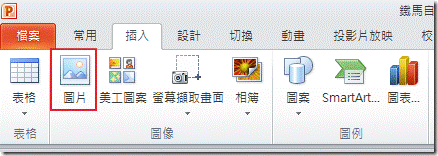
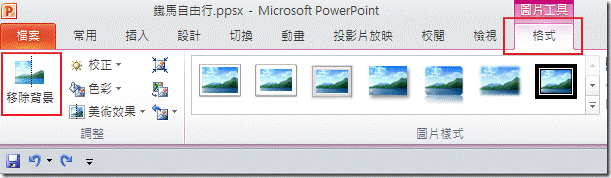
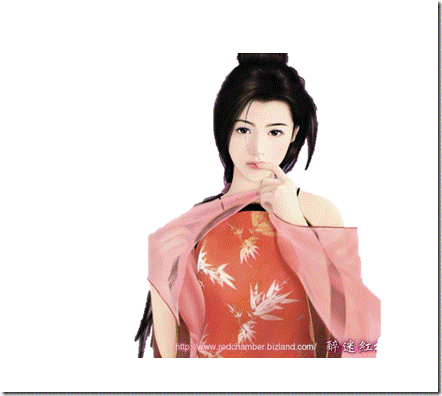
1.點選[插入]功能標籤 <br />2.圖片,選擇要插入的 圖片 <br /><a href="http://lh4.ggpht.com/_dZxhLfWjff4/S9pt0R9oYQI/AAAAAAAAC-E/IVp7NQNX1qI/s1600-h/image%5B6%5D.png"><img alt="clip_image002" border="0" height="156" src="http://lh6.ggpht.com/_dZxhLfWjff4/TDJwekJNCJI/AAAAAAAAFLU/QFp4NEzlvJc/clip_image002%5B3%5D.gif?imgmax=800" style="border: 0px none; display: inline;" title="clip_image002" width="438" /><a name='more'></a></a> <br />3.去背範例圖 <br /><a href="http://lh5.ggpht.com/_dZxhLfWjff4/S9pt2gXscKI/AAAAAAAAC-M/Gq7ejYkvuYs/s1600-h/image%5B11%5D.png"><img alt="clip_image004" border="0" height="379" src="http://lh6.ggpht.com/_dZxhLfWjff4/TDJwfqq1edI/AAAAAAAAFLY/MOyZhyY9oZo/clip_image004%5B3%5D.gif?imgmax=800" style="border: 0px none; display: inline;" title="clip_image004" width="504" /></a> <br />4.點選圖片工具[格式]功能標籤 <br />5.點選移 除背景 <br /><a href="http://lh5.ggpht.com/_dZxhLfWjff4/S9pt_9iXRwI/AAAAAAAAC-Y/5raTcdhIIy8/s1600-h/image%5B15%5D.png"><img alt="clip_image006" border="0" height="178" src="http://lh4.ggpht.com/_dZxhLfWjff4/TDJwglX3rqI/AAAAAAAAFLc/TfSKH72wEng/clip_image006%5B3%5D.gif?imgmax=800" style="border: 0px none; display: inline;" title="clip_image006" width="611" /></a> <br />6.調整要去保留的區域 <br />7.使用+標示區域以 保留,標示位置 <br />8.完成後點選[保留變更] <br /><a href="http://lh3.ggpht.com/_dZxhLfWjff4/S9puBi9G1KI/AAAAAAAAC-g/xtHemJmPAyQ/s1600-h/image%5B20%5D.png"><img alt="clip_image008" border="0" height="434" src="http://lh5.ggpht.com/_dZxhLfWjff4/TDJwhX6xTbI/AAAAAAAAFLg/kAOTSkLkD9c/clip_image008%5B3%5D.gif?imgmax=800" style="border: 0px none; display: inline;" title="clip_image008" width="604" /></a> <br />9.以下為完成去背的效果 <br /><a href="http://lh3.ggpht.com/_dZxhLfWjff4/S9puD6XpgcI/AAAAAAAAC-o/61p7saRdHKE/s1600-h/image%5B24%5D.png"><img alt="clip_image010" border="0" height="396" src="http://lh4.ggpht.com/_dZxhLfWjff4/TDJwiRO8vfI/AAAAAAAAFLk/kKrusyJVhQ8/clip_image010%5B3%5D.gif?imgmax=800" style="border: 0px none; display: inline;" title="clip_image010" width="442" /></a>